vendredi 9 décembre 2011

Partners getting leverage by selling Open ERP Enterprise


There are few partners of Open ERP in Asia who all ready started selling Open ERP Enterprise (in short-Open ERP's AMC-Annual Maintenance Contract) and focusing on acquiring of new first time clients for an Open ERP implementation. By doing this, they can get more customers and ultimately more profit out of Open ERP implementation.
Very soon we'll provide you details of those partners who have all ready sold Open ERP Enterprise service and got excellent response from their end client .


Asian market is doing great pertaining to its growth engine story and Open ERP is design for SME segment. Thus, there is undefined expansion and earning potential available for those who wanted to grow in this turbulent time period.  


To know how it's possible please, contact dtr [at] openerp.com 

dimanche 13 février 2011

Global IT spending surges in 2010

The global IT market staged a healthy comeback last year, with expenditure on IT products and services rising 8 per cent from 2009 to more than USD 1.5 trillion, according to market research firm IDC's Worldwide Black Book report released on Wednesday. The market research firm's 2010 report indicated that the IT industry registered its fastest growth rate since 2007 during the year gone by. Global spending on information technology was driven by pent-up demand for hardware upgrades and infrastructure investment after the financial crisis and global recession of 2009, as per the report. Factoring in the telecommunications segment, the overall ICT (information and communications technology) market saw spending climb to almost USD 3 trillion, up 6 per cent from 2009. Growth was driven by the need and ability of businesses to spend money to refresh their hardware and invest in technology infrastructure, according to the IDC.

"Like the global economy, the global IT industry performed better than expected in 2010," Stephen Minton, the Vice-President of IDC's IT markets and strategies group, said in a statement. "With business profits and stock markets back into a cycle of growth, many organisations took the opportunity to make up for lost time by upgrading mission critical systems and infrastructure over the course of the year." IDC found that demand for new hardware drove the rebound in 2010, as spending on computers, peripherals, storage technology, mobile devices and network equipment rose by 16 per cent to more than USD 661 billion, the fastest growth rate for hardware since 1996.

Breaking down the results, spending on storage products alone grew by 14 per cent, spending on servers by 9 per cent and spending on PCs by 11 per cent. Spending on software, though not as robust, also rose by 4 per cent, while spending on IT services grew by 2 per cent. IT spending in the US rose by 6 per cent last year and should grow by another 5 per cent in 2011, as per the report. Developing economies were the force behind much of the growth in 2010 and should continue to be so in 2011. Not counting Japan, the Asia/Pacific region's IT market climbed by 13 per cent last year and is expected to register a 10 per cent increase this year. IDC is also looking for double-digit growth from Central and Eastern Europe, Latin America and the Middle East and Africa. IT spending in more developed economies, such as Western Europe, Japan, and Canada, will grow, but at slower rates, IDC said.


Source: The Economic Times

mardi 4 janvier 2011

Appreciation from OpenERP partners and best wishes.

Dear Drupad and OpenERP team ,

It has been one of the best decision to not only adopt OpenERP but to be actually one of the partners of OpenERP.

We enjoy and appreciate as we can leverage on this great platform and definitely looking forward for growing our business with OpenERP ,

We would like to wish you have a successful year 2011 ahead and we know that the OpenERP team has been working hard to release v6 and we wish everyone in OpenERP team will reap even more victories in the year 2011.

cheers !


--
Thanks and Best Regards,

Kalmen Chia

Business Development Manager
*E-Global SCM Solutions Sdn Bhd*
Integrate.Collaborate.Accelerate
*http://www.e-globalscm.com*

mardi 2 novembre 2010

What's new in OpenERP 6.0 Payroll module ?

 ?After a small break I am back to show some of the interesting features of OpenERP 6.0. In this blog I am going to explain how you can configure and use the payroll efficiently which is also integrated to the holiday management and accountings. The major changes in payroll module are, you can use this module without installing the accounting module. The dependency to the account module is removed in the 6.0 which was there in the version 5.0. So, there are two different module hr_payroll and hr_payroll_account.

Lets install the payroll module, follow the steps described below.
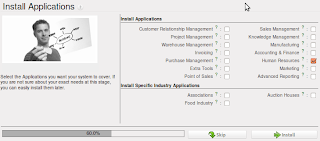
Select the Human Resource Application
Customize the Human Resource application further to have the capabilities of the payroll.
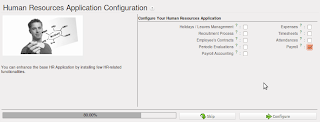
Select the Payroll Management
Lets start with the Configuration
Payroll Configuration
Payroll configuration is very easy, there are two important objects that we have to configure to run the payroll calculations and other computations. First and most important object is Salary Heads, which is used to define the major heads of salary.
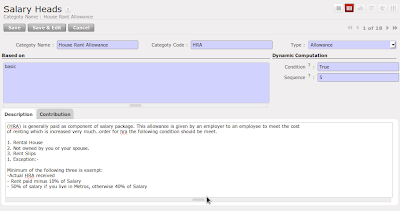
Salary Heads - HRA Configuration
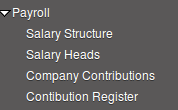
Look at the detailed configuration for the head Provident Fund, where we have to configure the company contributions on the head. You can define the list of contributions and associated register. Using contribution register you can track the contribution of the employee and company.
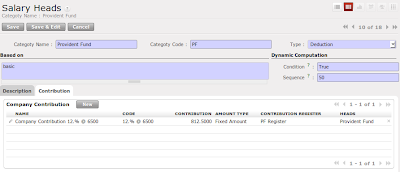
Salary Heads with Contribution configuration
The most important configuration in salary heads are the fields named 'code', 'based on' and 'sequence', all codes becomes variable so that you can use these all variables in calculating the base amount for any other salary heads, all used variables in calculations should required to have more priority. Lets take an example normally in India some allowances like house rent allowance (it is in % and not fix) is based on the basic + da so you can configure in this way, Based  on house rent allowance could be basic + da, where basic is the predefined variable and da is the code of Dearness Allowance head.

List of predefined variables you can use : basic, gross, net
Some of the example to construct the base :  (basic + da) / 5 * hra

So, Here we finished the configuration of the salary heads.  Lets see how to define the salary structure, normally salary structure is nothing but the breakup of the salary in terms of allowances and deductions so that some of the allowances and deductions employee can claim for saving the tax. Again salary structure definition is based on the company policy and employee's grades or pay scale.
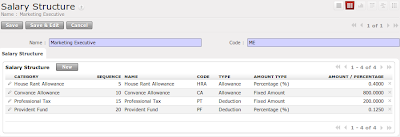
Salary Structure for Marketing Executive
Now, you must be thinking that if this is the fix structure for the marketing executive then where to configure the incentive on sales or special allowances based on the contract ?, There is a way that you can add the special configuration in the employee where you can define the special allowance and deductions for the specific employees. Lets see how to configure the employee special request to deduct the 500 Rs of tax every month.
Special Computation for Employees
Look at the Salary structure report, its improved a lot, so now you can see the employee's basic salary, gross salary and Net salary, also you can see the list of allowance and deductions with the total amount.
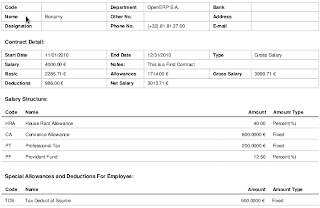
Employee's Salary structure includes detailed Information
Now finally we have to link the salary structure to the employee contract, where we have to define the employee's wages details and breakup in terms of the salary structure. 
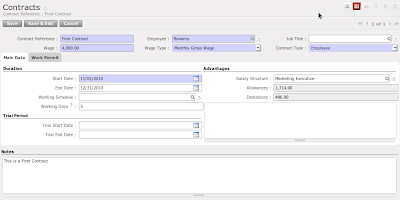
Basic pay 4000 with the Marketing Executive Pay Scale
Lets go to the salary calculation process that HR manager has to do every month. 
  • Prepare a Salary Register
  • Prepare the Bank Advice
Every month hr manager have to prepare a salary register form the Payroll Register menu. Just open form and configure few things like Name of the Register, and Bank details, and press the compute button. It will compute the salary slip for all employees. 
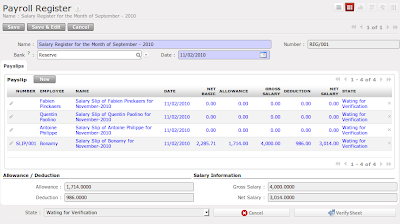
Salary Register of September - 2010
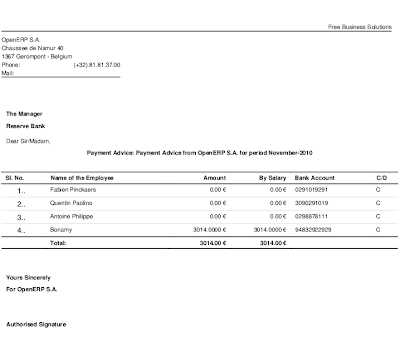
Once you go through all the verification procedures like HR Check, Account Check you will get the Payment advice created under the Payment Advice Menu. You just have to type the required message, cheque numbers in side that advice and you can directly give this for the salary payment along with the pay order / cheques. 
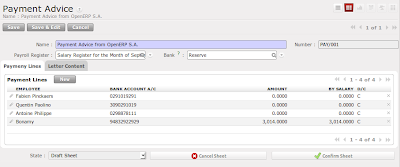
Bank Payment Advice
Payment Advice Report
Payment Advice - Reports
So, this is very small introduction about the OpenERP 6.0 Payroll module. The major change in the OpenERP 6.0 payroll module is it won't install the accounting if you just want to run the payroll without accounting. If you wanted to do the  integrated accounting then install the module hr_payroll_account. May be in my next post I will try to make complete video for the payroll processing.

mardi 19 octobre 2010

dimanche 17 octobre 2010

Want to access OpenERP using Java XML-RPC ?

XML-RPC can be used with Python, Java, Perl, PHP, C, C++, Ruby, Microsoft’s .NET and many other programming languages. Implementations are widely available for platforms such as Unix, Linux, Windows and the Macintosh.

You can download the xml-rpc library from apache, and test the following code to do the login, create, write read, search, I will test and put the correct syntax for the rest of the service like wizard workflow and report. currently i have tested this library for the common and object service only.

Login to OpenERP using Java XML-RPC

vendredi 1 octobre 2010

Usability - Its not a matter of Look and Feel

Look and Feel is one of the important factor in the software to attract people. OpenERP is one of the best management software now looking forward to the most important issue that is faced by majority softwares now a days and that is Usability of softwares. In the version 5.0 there ware many changes made compared to the version 4.2 and version 4.0.
Partner Form - Tiny ERP 4.2
A normal Tabbed form
Version 5.0 came up with the biggest changes in the view that was implementation of the search view where we have the primary search fields select="1" and extended search fields by select="2".
Search view with Primary fields
Second major change was in the form view, which was the six columns view on the top of the form instead of the normal 4.0's tabbed page form.
Partner Form - OpenERP 5.0
Visible six column top fields on all tabs 
Now finally in the upcoming OpenERP Version 6.0 we all are exiting about the new look. Usability is  one of the important factor which is being handled by Aline Preillon. Lets see the new Search view and the Form view of partner.
Partner search Form - Version 6.0
Form view in OpenERP 6.0 - Its not having big changes, but yes of course some of the widgets seems to be improved a lot. For example, One2Many widget has now having the paging facility, also we can edit and create a record in the Many2Many widget.
Partner form view - OpenERP 6.0
By looking at all above screens, we can easily identify the differences in version 6.0 compared to  versions 4.0 or 5.0.
Define your own customer Search View
Version 6.0 has done twice improvement in the user friendliness. The new type of view is introduced in  version 6.0 from which we can define our own custom search view for any form. These are on the fly discussion about the OpenERP Usability. Lets see in the detail what OpenERP mean by the Usability. 

Usability In Installation
Installation process is one more important factor in any software. Easy and assistive installation steps can make software easily understandable and usable. OpenERP makes it very easy with few click installation steps which allows user to install the software easily and according to their needs. Correct ordering of the installation steps can give the required information at desired place. Look at some of the wizard steps from the Version 5.0.
First Step : Single click module selection
The configuration wizard will be launched after installation. This wizard depended on the installed modules, and asked for more customization in it. Look at the account configuration wizard which ask for the accounting configurations. 
Account configuration wizard
OpenERP have stared to think on it since version 4.0. In version 5.0 it came up with the best idea that allows user to place their configuration wizard after installing or upgrading the modules.
Selection of the Business Applications
OpenERP configuration wizard in version 6.0 gives the more options for further customization. Look at the Account configuration wizard below.
Account configuration wizard in OpenERP Version 6.0
Now, OpenERP also takes care for all trunk modules to track them and suggest to the users during the configurations steps. Like if you install Financial Accounting application, it will suggest you some supportive modules for the accounting. Look at the screens below. Some of the module are selected by default and suggest you to install it to get the great experience.
Suggested module for the Accounting Support.

Usability in modularity of OpenERP

OpenERP is famous for its modularity approach. It can easily fit in small organizations, also allows user to expand their business with the lower expansion cost for management software(OpenERP). Version 6.0 seems to be more focused in the same area and the major changes we ever saw in the older versions, are going to be delivered in version 6.0. The major inter-module dependency is removed now. OpenERP will allow users to install application with the limited dependent modules. For example, Sale module will not ask mrp module to install, which was the biggest dependency in the older versions. Look at the module dependency graph below.
Object Dependency to Install Sale module. 
Now, OpenERP will act as a Business Application rather then ERP for specific business verticals. Look at the new menu structure which is specially designed to meet the Individual Application like Sales, Purchase, Stock, Accounts, Human Resource, Etc..
OpenERP Menus
Left: Version 5.0, Right: Version 6.0
The complete new menus structure is based on the Business Application. It is possible due to major changes in to the OpenERP modules inter-dependencies.

Usability in Menus
OpenERP 5.0 has many menus for the single object. Like for the Customer Invoice. It was designed to separate the object state wise like Draft, Confirm, Open, and sometimes depends on the Users.
OpenERP 5.0. Accounting Menu
Menu structure in new version is very easy to access, just single menu with the filters on the search view will allow user to filter the data according to the state on the single form. Look at the account menu in the below.
OpenERP 6.0. Accounting Menu
Customer Invoice List view with the filter options
Customer Invoice List View
Still there are so many things to discuss for the OpenERP Usability, You can go through the usability book.