lundi 23 avril 2012

Welcome to New CTP Partner In Malaysia !


We are happy to announce that we have added new CTP Partner in Open ERP community. OpenERP has designed a Certified Training Partner Program to leverage OpenERP training capabilities worldwide.This program aim is to enable OpenERP Partners to provide a consistent and high quality level of training. OpenERP Partners who wish to be appointed as a Certified Training Partner They provide specialized functional and Technical Training aspects in ERP solutions comprising- Product lifecycle management, Supply chain management, Warehouse Management, Customer Relationship Management, Sales Order Processing, Online Sales, Financials, Human Resources and Decision Support System etc. Now they have joined hands with us to give new reach to Open ERP application.

INGENUITY is a Malaysian company synonymous with Provision of ready-to-market business software, Open source ERP solutions, Deployment of hardware and ICT related integration services, Consumer and retail IT and electronics, Research and development of enterprise applications. 

With the capabilities to deliver comprehensive IT solutions from SMEs to MNCs, Ingenuity provides tailored ERP solutions to meet business requirements by integrating existing databases with business applications such as Accounting, CRM, Warehousing, Logistic, HRM, Marketing, Project, Manufacturing for our clients in various industries. 

dimanche 19 février 2012

Welcome to New CTP Partner In Indonesia !


We are happy to announce that we have added new CTP Partner in Open ERP community. OpenERP has designed a Certified Training Partner Program to leverage OpenERP training capabilities worldwide.This program aim is to enable OpenERP Partners to provide a consistent and high quality level of training. OpenERP Partners who wish to be appointed as a Certified Training Partner They provide specialized functional and Technical Training aspects in ERP solutions comprising- Product lifecycle management, Supply chain management, Warehouse Management, Customer Relationship Management, Sales Order Processing, Online Sales, Financials, Human Resources and Decision Support System etc. Now they have joined hands with us to give new reach to Open ERP application. 

Adsoft (PT Alam Dewata Utama), an Indonesian private limited company, was founded in year 2001, specializes in providing OpenERP Consulting, Development, Support and Training for Enterprises in Indonesia, leveraging packaged open source software which provides significant benefits over proprietary software including customizability, scalability, ease of use and low total cost of ownership.
We have expertises in Enterprise Resource Planning (ERP), Customer Relationship Management (CRM), Human Resource Management (HRM), Business Intelligence, Data and System Integration and Web Design and Development. For more information, please visit our website at http://www.adsoft.co.id

Checks the events on http://www.openerp.com/events hosted by Adsoft.

vendredi 9 décembre 2011

Partners getting leverage by selling Open ERP Enterprise


There are few partners of Open ERP in Asia who all ready started selling Open ERP Enterprise (in short-Open ERP's AMC-Annual Maintenance Contract) and focusing on acquiring of new first time clients for an Open ERP implementation. By doing this, they can get more customers and ultimately more profit out of Open ERP implementation.
Very soon we'll provide you details of those partners who have all ready sold Open ERP Enterprise service and got excellent response from their end client .


Asian market is doing great pertaining to its growth engine story and Open ERP is design for SME segment. Thus, there is undefined expansion and earning potential available for those who wanted to grow in this turbulent time period.  


To know how it's possible please, contact dtr [at] openerp.com 

dimanche 13 février 2011

Global IT spending surges in 2010

The global IT market staged a healthy comeback last year, with expenditure on IT products and services rising 8 per cent from 2009 to more than USD 1.5 trillion, according to market research firm IDC's Worldwide Black Book report released on Wednesday. The market research firm's 2010 report indicated that the IT industry registered its fastest growth rate since 2007 during the year gone by. Global spending on information technology was driven by pent-up demand for hardware upgrades and infrastructure investment after the financial crisis and global recession of 2009, as per the report. Factoring in the telecommunications segment, the overall ICT (information and communications technology) market saw spending climb to almost USD 3 trillion, up 6 per cent from 2009. Growth was driven by the need and ability of businesses to spend money to refresh their hardware and invest in technology infrastructure, according to the IDC.

"Like the global economy, the global IT industry performed better than expected in 2010," Stephen Minton, the Vice-President of IDC's IT markets and strategies group, said in a statement. "With business profits and stock markets back into a cycle of growth, many organisations took the opportunity to make up for lost time by upgrading mission critical systems and infrastructure over the course of the year." IDC found that demand for new hardware drove the rebound in 2010, as spending on computers, peripherals, storage technology, mobile devices and network equipment rose by 16 per cent to more than USD 661 billion, the fastest growth rate for hardware since 1996.

Breaking down the results, spending on storage products alone grew by 14 per cent, spending on servers by 9 per cent and spending on PCs by 11 per cent. Spending on software, though not as robust, also rose by 4 per cent, while spending on IT services grew by 2 per cent. IT spending in the US rose by 6 per cent last year and should grow by another 5 per cent in 2011, as per the report. Developing economies were the force behind much of the growth in 2010 and should continue to be so in 2011. Not counting Japan, the Asia/Pacific region's IT market climbed by 13 per cent last year and is expected to register a 10 per cent increase this year. IDC is also looking for double-digit growth from Central and Eastern Europe, Latin America and the Middle East and Africa. IT spending in more developed economies, such as Western Europe, Japan, and Canada, will grow, but at slower rates, IDC said.


Source: The Economic Times

mardi 4 janvier 2011

Appreciation from OpenERP partners and best wishes.

Dear Drupad and OpenERP team ,

It has been one of the best decision to not only adopt OpenERP but to be actually one of the partners of OpenERP.

We enjoy and appreciate as we can leverage on this great platform and definitely looking forward for growing our business with OpenERP ,

We would like to wish you have a successful year 2011 ahead and we know that the OpenERP team has been working hard to release v6 and we wish everyone in OpenERP team will reap even more victories in the year 2011.

cheers !


--
Thanks and Best Regards,

Kalmen Chia

Business Development Manager
*E-Global SCM Solutions Sdn Bhd*
Integrate.Collaborate.Accelerate
*http://www.e-globalscm.com*

mardi 2 novembre 2010

What's new in OpenERP 6.0 Payroll module ?

 ?After a small break I am back to show some of the interesting features of OpenERP 6.0. In this blog I am going to explain how you can configure and use the payroll efficiently which is also integrated to the holiday management and accountings. The major changes in payroll module are, you can use this module without installing the accounting module. The dependency to the account module is removed in the 6.0 which was there in the version 5.0. So, there are two different module hr_payroll and hr_payroll_account.

Lets install the payroll module, follow the steps described below.
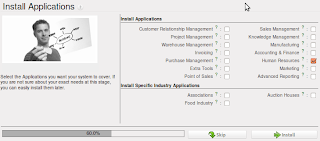
Select the Human Resource Application
Customize the Human Resource application further to have the capabilities of the payroll.
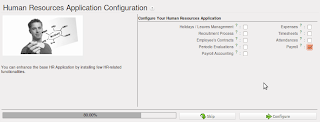
Select the Payroll Management
Lets start with the Configuration
Payroll Configuration
Payroll configuration is very easy, there are two important objects that we have to configure to run the payroll calculations and other computations. First and most important object is Salary Heads, which is used to define the major heads of salary.
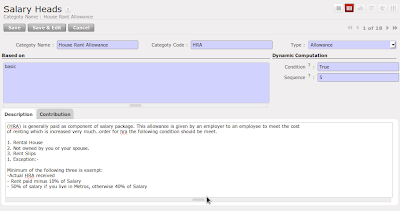
Salary Heads - HRA Configuration
Look at the detailed configuration for the head Provident Fund, where we have to configure the company contributions on the head. You can define the list of contributions and associated register. Using contribution register you can track the contribution of the employee and company.
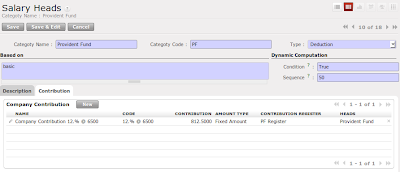
Salary Heads with Contribution configuration
The most important configuration in salary heads are the fields named 'code', 'based on' and 'sequence', all codes becomes variable so that you can use these all variables in calculating the base amount for any other salary heads, all used variables in calculations should required to have more priority. Lets take an example normally in India some allowances like house rent allowance (it is in % and not fix) is based on the basic + da so you can configure in this way, Based  on house rent allowance could be basic + da, where basic is the predefined variable and da is the code of Dearness Allowance head.

List of predefined variables you can use : basic, gross, net
Some of the example to construct the base :  (basic + da) / 5 * hra

So, Here we finished the configuration of the salary heads.  Lets see how to define the salary structure, normally salary structure is nothing but the breakup of the salary in terms of allowances and deductions so that some of the allowances and deductions employee can claim for saving the tax. Again salary structure definition is based on the company policy and employee's grades or pay scale.
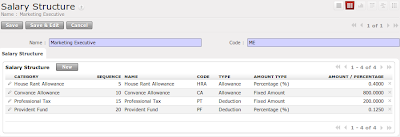
Salary Structure for Marketing Executive
Now, you must be thinking that if this is the fix structure for the marketing executive then where to configure the incentive on sales or special allowances based on the contract ?, There is a way that you can add the special configuration in the employee where you can define the special allowance and deductions for the specific employees. Lets see how to configure the employee special request to deduct the 500 Rs of tax every month.
Special Computation for Employees
Look at the Salary structure report, its improved a lot, so now you can see the employee's basic salary, gross salary and Net salary, also you can see the list of allowance and deductions with the total amount.
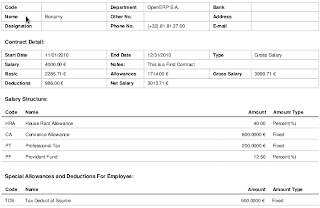
Employee's Salary structure includes detailed Information
Now finally we have to link the salary structure to the employee contract, where we have to define the employee's wages details and breakup in terms of the salary structure. 
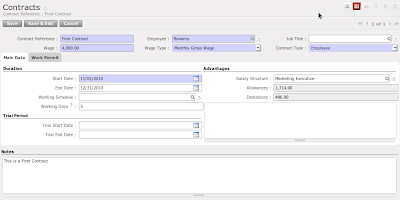
Basic pay 4000 with the Marketing Executive Pay Scale
Lets go to the salary calculation process that HR manager has to do every month. 
  • Prepare a Salary Register
  • Prepare the Bank Advice
Every month hr manager have to prepare a salary register form the Payroll Register menu. Just open form and configure few things like Name of the Register, and Bank details, and press the compute button. It will compute the salary slip for all employees. 
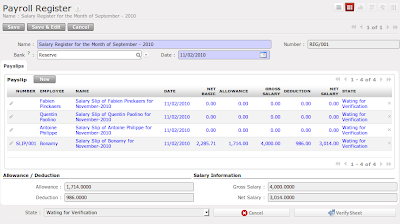
Salary Register of September - 2010
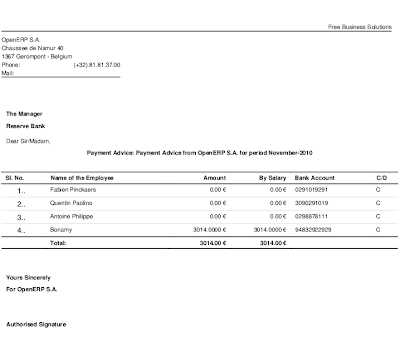
Once you go through all the verification procedures like HR Check, Account Check you will get the Payment advice created under the Payment Advice Menu. You just have to type the required message, cheque numbers in side that advice and you can directly give this for the salary payment along with the pay order / cheques. 
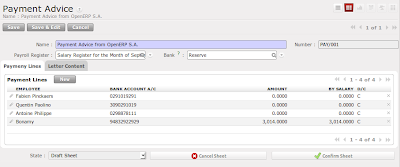
Bank Payment Advice
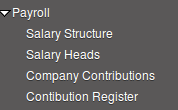
Payment Advice Report
Payment Advice - Reports
So, this is very small introduction about the OpenERP 6.0 Payroll module. The major change in the OpenERP 6.0 payroll module is it won't install the accounting if you just want to run the payroll without accounting. If you wanted to do the  integrated accounting then install the module hr_payroll_account. May be in my next post I will try to make complete video for the payroll processing.

mardi 19 octobre 2010

dimanche 17 octobre 2010

Want to access OpenERP using Java XML-RPC ?

XML-RPC can be used with Python, Java, Perl, PHP, C, C++, Ruby, Microsoft’s .NET and many other programming languages. Implementations are widely available for platforms such as Unix, Linux, Windows and the Macintosh.

You can download the xml-rpc library from apache, and test the following code to do the login, create, write read, search, I will test and put the correct syntax for the rest of the service like wizard workflow and report. currently i have tested this library for the common and object service only.

Login to OpenERP using Java XML-RPC

vendredi 1 octobre 2010

Usability - Its not a matter of Look and Feel

Look and Feel is one of the important factor in the software to attract people. OpenERP is one of the best management software now looking forward to the most important issue that is faced by majority softwares now a days and that is Usability of softwares. In the version 5.0 there ware many changes made compared to the version 4.2 and version 4.0.
Partner Form - Tiny ERP 4.2
A normal Tabbed form
Version 5.0 came up with the biggest changes in the view that was implementation of the search view where we have the primary search fields select="1" and extended search fields by select="2".
Search view with Primary fields
Second major change was in the form view, which was the six columns view on the top of the form instead of the normal 4.0's tabbed page form.
Partner Form - OpenERP 5.0
Visible six column top fields on all tabs 
Now finally in the upcoming OpenERP Version 6.0 we all are exiting about the new look. Usability is  one of the important factor which is being handled by Aline Preillon. Lets see the new Search view and the Form view of partner.
Partner search Form - Version 6.0
Form view in OpenERP 6.0 - Its not having big changes, but yes of course some of the widgets seems to be improved a lot. For example, One2Many widget has now having the paging facility, also we can edit and create a record in the Many2Many widget.
Partner form view - OpenERP 6.0
By looking at all above screens, we can easily identify the differences in version 6.0 compared to  versions 4.0 or 5.0.
Define your own customer Search View
Version 6.0 has done twice improvement in the user friendliness. The new type of view is introduced in  version 6.0 from which we can define our own custom search view for any form. These are on the fly discussion about the OpenERP Usability. Lets see in the detail what OpenERP mean by the Usability. 

Usability In Installation
Installation process is one more important factor in any software. Easy and assistive installation steps can make software easily understandable and usable. OpenERP makes it very easy with few click installation steps which allows user to install the software easily and according to their needs. Correct ordering of the installation steps can give the required information at desired place. Look at some of the wizard steps from the Version 5.0.
First Step : Single click module selection
The configuration wizard will be launched after installation. This wizard depended on the installed modules, and asked for more customization in it. Look at the account configuration wizard which ask for the accounting configurations. 
Account configuration wizard
OpenERP have stared to think on it since version 4.0. In version 5.0 it came up with the best idea that allows user to place their configuration wizard after installing or upgrading the modules.
Selection of the Business Applications
OpenERP configuration wizard in version 6.0 gives the more options for further customization. Look at the Account configuration wizard below.
Account configuration wizard in OpenERP Version 6.0
Now, OpenERP also takes care for all trunk modules to track them and suggest to the users during the configurations steps. Like if you install Financial Accounting application, it will suggest you some supportive modules for the accounting. Look at the screens below. Some of the module are selected by default and suggest you to install it to get the great experience.
Suggested module for the Accounting Support.

Usability in modularity of OpenERP

OpenERP is famous for its modularity approach. It can easily fit in small organizations, also allows user to expand their business with the lower expansion cost for management software(OpenERP). Version 6.0 seems to be more focused in the same area and the major changes we ever saw in the older versions, are going to be delivered in version 6.0. The major inter-module dependency is removed now. OpenERP will allow users to install application with the limited dependent modules. For example, Sale module will not ask mrp module to install, which was the biggest dependency in the older versions. Look at the module dependency graph below.
Object Dependency to Install Sale module. 
Now, OpenERP will act as a Business Application rather then ERP for specific business verticals. Look at the new menu structure which is specially designed to meet the Individual Application like Sales, Purchase, Stock, Accounts, Human Resource, Etc..
OpenERP Menus
Left: Version 5.0, Right: Version 6.0
The complete new menus structure is based on the Business Application. It is possible due to major changes in to the OpenERP modules inter-dependencies.

Usability in Menus
OpenERP 5.0 has many menus for the single object. Like for the Customer Invoice. It was designed to separate the object state wise like Draft, Confirm, Open, and sometimes depends on the Users.
OpenERP 5.0. Accounting Menu
Menu structure in new version is very easy to access, just single menu with the filters on the search view will allow user to filter the data according to the state on the single form. Look at the account menu in the below.
OpenERP 6.0. Accounting Menu
Customer Invoice List view with the filter options
Customer Invoice List View
Still there are so many things to discuss for the OpenERP Usability, You can go through the usability book.

dimanche 26 septembre 2010

Currency Symbols in OpenERP

OpenERP is doing lots of Improvement from the usability point of view. There is a small but good improvement in the reports that is allows to print the currency symbol on the report.

Currency configuration with new field Symbol
a
All accounting reports are improved, now all reports are displaying the currency symbol with the amount. It helps lot when the reports are showing the multi-currency transactions. Look at the partner ledger reports which is heaving the multiple currency transaction.

Partner ledger report

Are you waned to add the Indian currency symbol ₹ to OpenERP ?
Click here

lundi 20 septembre 2010

Account Voucher – Handling multiple currency

Here is one more video related to the account voucher, show you how easily you can manage the multiple currency during the sales and payment transactions.

Voucher made periodical reconciliation very easy

Hello !!

You have seen the simplicity of the Sales Receipt, and Sales Payment in my last two videos. It is very easy to working with the Vouchers. Manual and Automatic reconciliation are the ways to manage the periodical reconciliation process. We have also a way to manage bank reconciliation using Bank Statements.  In all the cases we have to take care in the reconciliation process that we have to match the correspondence entries to reconcile. The new innovative way which voucher offers is really simple and user friendly. It will automatically reconcile sales, and purchase with the payment, receipt and available credits.

Example:
Advance Payment from Axelor - 200 EUR
Customer Invoice - 200 EUR
Sales Receipt - 200 EUR
Full Outstanding Payment - 200 EUR
Reconcile all Advance payment and Invoices.

Accounting Vouchers - Sales Payment

Hello !!

Here is one more video that demonstrate the Sales payment very simple and easy account entry encoding system, which is develop for the OpenERP new version 6.0. you can see its very easy to do a sales entry with the sales tax, and easy to track the entries too.


More videos on the OpenERP 6.0 Account will be available soon.

Accounting Vouchers - Sales Receipt

Hello !!

After a long time i am going to publish a videos that demonstrate the very simple and easy account entry encoding system, which is develop for the OpenERP new version 6.0. you can see its very easy to do a sales entry with the sales tax, and easy to track the entries too.


Move videos on the OpenERP 6.0 Account will be available soon.

What's new in OpenERP 6.0 Accounting ?

Hello !!

I am back after a long time to discuss on the OpenERP and specially new features & enhancements in the Accounting system in new version. There are lots of improvement s to make it more simple to explore, user friendly and easy to use. There are small but important changes are terminology of the accounting terms, mature reports, easy predictable navigation of menus, and fully utilization of new features built for the OpenERP Framework Version 6.0.

If I list out some of the important developments and enhancements, it will be as follows:
  1. Re-structuring of Menus - now its very easy to predict and find the desired menus.
  2. Inbuilt multi-company feature - no need to install any module.
  3. Inbuilt multi-currency feature - no need to install any module.
  4. New legal reports - Profit & Loss account and Balance Sheet.
  5. Common Filter system for all Accounting Reports - filtering on dates, periods, journals, etc..
  6. Simplified entry system for accountants - Sales, Purchase, Payment and Receipt Entries.
  7. Improved Tax calculations.
  8. Cash Register.
  9. Easy to Tracking Invoices and Accounting Entries.

New menu structure of Account application.
Easy and simplified Menu arrangements


Legal Reports - Profit and Loss account, Balance sheet
Profit and Loss Account
Profit and Loss Account Report
Balance Sheet Report
Balance Sheet


Reporting and common filters
Now you can see common report filter on all accounting reports, which will give you the facility to filter on the chart of account, Fiscal Year, Journals, Periods, Start and End Dates, also provide you the facility to change the display of reports like sorting on Date, Partners, Journals and Reports formats and other parameters. 
Common Filters for All Accounting Reports


Simplified Entry System
Now it is very easy to do Sales, Purchase, Bank / Cash Payment and  Bank / Cash Receipt just in one click, you can also add the tax and due dates while dealing with the Sales and Purchase receipt, also no need to remember outstanding bills and amount for any customers or suppliers, payment and receipt will automatically detests them. 

Sales Receipt
General Sales Entry with TAX
Sales Payment
Payment from Customer against the Outstanding Invoice


Cash Register
Now its possible with the OpenERP 6.0 to maintain the cash book like the Bank statements. Open / Close a cash box daily, weekly or monthly based on the needs.

Open Cash box with Initial Balance
Cash box with Initial Balance
Cash Transactions
Cash Transactions
Closing Cash Box
Closed cash box verified with the closing Balance
So, this way we have a complete track on the cash box, from the next statement . No need to enter the opening balance manually, the closing balance of previous statement will be carry forward to the next statement, also you can modify the carry forwarded balance too.

mercredi 31 mars 2010

Welcome To Our New Partner In India

We are happy to announce that we have added new partner in Open ERP
community. They provide specialized functional aspects in ERP solutions
comprising- Product lifecycle management, Supply chain management,
Warehouse Management, Customer Relationship Management, Sales Order
Processing, Online Sales, Financials, Human Resources and Decision
Support System etc. Now they have joined hands with us to give new reach
to Open ERP application. Please find the details of our new partner.

Samin TekMindz India Pvt. Ltd., Noida, India - www.tekmindz.com

So, we all wish them good luck for their coming projects on Open ERP.

lundi 16 novembre 2009

Hiding database name on login

It’s important to be able to hide database names from login screen for security purpose, the users who are known with Database names can login, for others database name is not accessible.

Now this enhancement is implemented in trunk server and client,

We have an option –list_db on the openobject server to disable the list of Databases,

Run server like:

./openerp-server.py –addons-path=../../../addons/ –list_db=False

If the option has value “False” it will provide a char field instead of having a selection box for the Databases, Or the user can specify database name manually:


If the database does not exist, it will raise and error:


After the first connexion, the DB name is stored on the ~/.openerprc and on the next login, the char field will be filled with the last database name connected.

The selection list is also removed from “Drop Database” and “Backup Database”

To summarize, –list_db=False option on OpenERP server lets us to hide all databases names from client…

Thanks & regards

Tiny ERP (Open ERP) Team

jeudi 27 août 2009

Faster Developent With Open ERP Gedit Plugin

In continuation to make development and customization for Open ERP easy and fast with tools like Object designer, Workflow designer, Report designer, View editor,we are happy to announce to you all launch of Open ERP Gedit (Text Editor) plugin. To build or customize business applications in very less time for Open ERP.

Now no need to remember syntax of source code, Geditor will give you freedom and make coding easy for Open ERP. For more detail please visit this link : Open ERP – Gedit . Here in this screen cast we have shown, how with Gedit one can develop a class for Partner module in Open ERP and can create a wizard for mailing. Also it will help coder by selecting different theme they can change color code to highlight syntax of Open ERP.

To download Gedit plugin kindly click on
1. Gedit plugin for Open ERP
2. Change theme in Gedit plugin

mardi 25 août 2009

Opportunity for ERP Enthusiasts With Open ERP

Hello Everybody,

Open ERP, is one of the most appreciated Open Source management software, with more than 700 downloads per day. It's available today in 18 languages and has a world network of partners and contributors with more than 90 partners and 1000 contributors. Such software has arisen from the blend of high code quality, well-judged architecture and use of free technologies. In fact, you may be surprised (if you're an IT person) to find that the size of whole Open ERP setup is less than 90 MB when you've installed the software.

Open ERP has released its new service offer - Odoo, the Ondemand ERP solution with minimal costs involved for end user. Its a SaaS (Software As A Service) offer from Open ERP, which provides access to end user without any investments or any infrastructural cost. It is mainly dedicated to small and/or medium enterprises and budding enterprises with limited IT budgets. With Odoo, you can get a ready-to-use and complete enterprise management software in a few clicks. Odoo is based on the latest stable version of Open ERP. It's a self-service and low-cost offer with a unique price that includes:

* Open ERP Hosting with high bandwidth and servers,
* Incremental backups servers,
* Software + Infrastructure as a Service,
* Maintenance with bugfixes and automated migrations,
* Open ERP control centre, etc.

The subscription to Odoo is free, one need to pay at the end of the month, only if he is satisfied. With Odoo, one pay only what he really use @ 0,60€ per hour. Also the 60 hours of use per month is for free. Get more informations under the website: http://www.odoo.com. This solution offers the possibility to get Open ERP in three clicks and use it anywhere at any time. You can subscribe to this solution here http://www.odoo.com/subscribe.html.

Recently Open ERP released its latest version 5.0.2 with new improvements and is full of user friendly new features like,

Better error messages for end users
Attributes for barcode
Improved reporting for accounts, logistics, sales, taxation, production, sales etc... for better IMS reporting.

You will find the Windows installers and the sources on Open ERP download page (http://www.openerp.com/downloads.html). This is the opportunity for any ERP enthusiast or business person to have on hand experience of world class ERP without incuring cost.

For more information contact sales@openerp.com or sales@odoo.com

lundi 24 août 2009

Open ERP Server With MySQL

SAServer will be Enhanced Version Open ERP-Server which will support all Major Databases.
Its main aim is to make Open ERP database independent. So end user can make their existing application as it and able to implement Open ERP easily on the same dababase.

How to get branches?

You need to checkout branch of sa-server :
bzr branch lp:~openerp-commiter/openobject-server/server-sa

For this server you need to get addons from this branch:
bzr branch lp:~openerp-commiter/openobject-addons/addons-sa

Use stable5.0 client for this server:

bzr branch lp:openobject-client/5.0

How to install SQLAlchemy?

Install newer version of sqlalchemy from 0.5.x series,
Download SQLAlchemy from this link:

http://sourceforge.net/projects/sqlalchemy/files/sqlalchemy/SQLAlchemy-0.5.3.tar.gz/download

Configure Mysql

In mysql you need to create new user named tiny:

CREATE USER ‘tiny’@'localhost’ IDENTIFIED BY ‘password’;

Grant privileges to this user by:

GRANT ALL PRIVILEGES ON *.* TO ‘tiny’@'localhost’

How to start server?

You can start sa-server using –engine option,

–engine=’database://USER:PASSWORD@HOSTNAME:PORT’

Where,

USER : mysql user (Super User)
PASSWORD : Password of USER
HOSTNAME : Host on which mysql server is running (By Default : localhost)
PORT : Port on which mysql server is running (By Default : 3306)

Ex: python openerp-server.py –engine=’mysql:tiny@//localhost’ –addons-path=../../addons-sa/

Now OpenERP server is ready to work with mysql database,